
設定例(ApresiaLightGM200シリーズ)
ネットワーク認証
DHCPスヌーピング
基本構成図
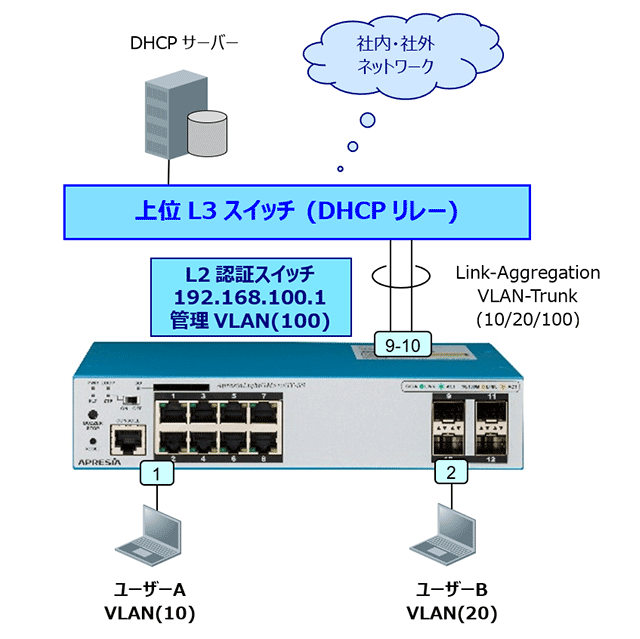
| DHCPスヌーピングスイッチのポート設定 | |||||
| ポート番号 | ポート種別 | 接続装置 | スヌーピング | VLAN | |
| 1 | アクセス | 端末-A | あり | 10 | |
| 2 | アクセス | 端末-B | あり(静的) | 20 | |
| 9-10 | トランク | L3スイッチ | なし | 10,20,100 | |
設定のポイント
L2認証スイッチ
- DHCP SnoopingのモードをDENYとする。
- ポートで特定の固定IPの端末を許可する場合は静的エントリーの作成を行う。
- DHCPサーバーの接続ポートにはスヌーピング設定を有効にしない。
L2認証スイッチの設定例
| VLANの設定 | |
| # configure terminal (config)# vlan 10,20,100 (config-vlan)# exit |
クライアント用にVLAN(10,20)を作成 管理用としてVLAN(100)を作成 |
| ポートの設定 | |
| (config)# interface port 1/0/1 (config-if-port)# switchport access vlan 10 (config-if-port)# exit |
VLAN(10)をuntagポート1に設定 |
| (config)# interface port 1/0/2 (config-if-port)# switchport access vlan 20 (config-if-port)# exit |
VLAN(20)をuntagポート2に設定 |
| (config)# interface range port 1/0/9-10 (config-if-port-range)# channel-group 1 mode on (config-if-port-range)# exit |
ポート9、10をスタティックのLAGグループ1として登録 |
| (config)# interface port-channel 1 (config-if-port-channel)# switchport mode trunk (config-if-port-channel)# switchport trunk allowed vlan 10,20,100 (config-if-port-channel)# exit |
VLAN(10,20,100)をtagポート9、10に設定 |
| 管理用IPアドレスの設定 | |
| (config)# no interface vlan 1 (config)# interface vlan 100 (config-if-vlan)# ip address 192.168.100.1/24 (config-if-vlan)# exit (config)# ip route default 192.168.100.254 |
管理用VLAN100にIPアドレス設定 |
| DHCPスヌーピングの設定 | |
| (config)# dhcp-snooping enable (config)# access-defender |
DHCPスヌーピング 機能の有効化 |
| (config-a-def)# dhcp-snooping interface port 1/0/1-2 | ポート1,2でDHCPスヌーピング機能を有効 |
| (config-a-def)# dhcp-snooping mode deny (config-a-def)# dhcp-snooping static-entry interface port 1/0/2 192.168.20.2 (config-a-def)# exit (config)# |
DHCPスヌーピングのモードをDENY設定 ポート2で特定のIPアドレスのみ許可 |
確認コマンド
- show access-defender client
- show access-defender port-configuration
- show access-defender dhcp-snooping configuration
- show access-defender dhcp-snooping status